Brilliant Student Font Review
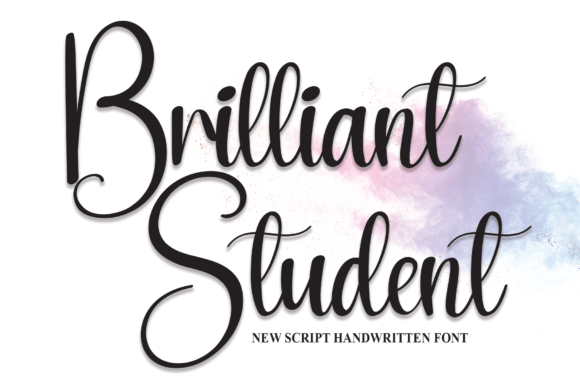
As a web designer, I’m always on the lookout for fonts that bring personality and clarity to a site without sacrificing usability. When I first tested Brilliant Student on a client’s portfolio homepage, I was immediately struck by its warm, approachable vibe. This handwritten script font from Script Amp feels like it was made for creative websites—perfect for headers, call-to-action buttons, and decorative accents.
Brilliant Student in Web Design
One of the first places I used Brilliant Student was on a hero section for a boutique online store. The font added a personal touch to the main headline, making the brand feel more human and relatable. It paired beautifully with a clean sans serif for the body text, creating a balance between creativity and readability. On mobile screens, the font remained legible even at smaller sizes, which is a big plus for responsive design.
I also tested it over an image banner for a digital course landing page. The soft curves of the letters complemented the visual elements without overpowering them. It worked well as a title for a section heading, drawing attention without being too bold or distracting. For CTA buttons, the font added a friendly yet professional tone, making the action feel inviting rather than pushy.
Best Uses for Brilliant Student
Brilliant Student shines in areas where a personal, artistic touch is needed. It’s ideal for website headers, especially on creative portfolios, coaching sites, or small business landing pages. I found it particularly effective for logo text when paired with a simple icon or symbol. Its organic flow makes it great for decorative accents in social media graphics or email newsletters.
For blog headers, the font adds a unique flair that stands out from standard typography. I used it on a recent redesign of a lifestyle blog, and it helped create a more engaging visual hierarchy. It also worked well for promotional banners on a product landing page, where it caught the eye without overwhelming the user.
When it comes to button design, Brilliant Student can be a great choice for non-transactional CTAs, such as “Join Our Community” or “Explore More.” However, I wouldn’t recommend using it for form labels or navigation menus, where clarity and consistency are key.
Font Pairing and Layout Performance
Pairing Brilliant Student with a modern sans serif like Roboto or Open Sans created a balanced and professional look. The contrast between the script and the clean lines of the sans serif made the layout feel dynamic but easy to read. For editorial-style designs, pairing it with a simple serif font like Lora or Georgia added a classic, refined feel.
In terms of layout performance, the font rendered smoothly across different browsers and devices. It didn’t cause any layout shifts or rendering issues, which is important for maintaining a consistent user experience. I also checked how it looked on dark backgrounds and light ones, and it maintained good contrast in both scenarios.
For image overlays, the font held up well against busy backgrounds, thanks to its clear strokes and readable structure. It worked well on a promotional banner with a gradient background, where the subtle texture of the script added depth without clashing.
Considerations for Web Use
While Brilliant Student is excellent for display purposes, it’s not the best choice for long paragraphs of text. Using it for body copy would make the content harder to scan and could negatively impact user engagement. I’d recommend sticking to short phrases, headings, and decorative elements instead.
For accessibility, it’s important to ensure sufficient contrast and avoid using the font in low-visibility areas. If you’re designing for users with visual impairments, consider using a more traditional typeface for critical information while reserving Brilliant Student for less essential text.
Before implementing the font on a live site, I always check for webfont availability and licensing. Brilliant Student includes multiple weights and styles, which is helpful for customizing the look of a website. It also supports multilingual characters, making it a versatile choice for international audiences.
Final Thoughts
Brilliant Student is a versatile and expressive font that brings warmth and character to digital projects. Whether you're designing a creative portfolio, a boutique online store, or a blog header, this font adds a personal touch that stands out. Its friendly style makes it perfect for web design elements that need a human, handmade feel without sacrificing clarity or usability.